







Digital Family Reunion 15 – Dec. 7th

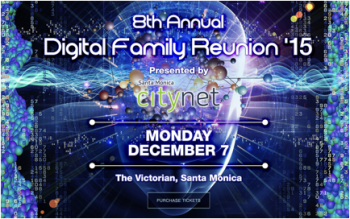
Come one, come all to the annual Digital Family Reunion holiday party!
This year we will be gathering at the Victorian in Santa Monica, CA for what will be the largest digital holiday party in Los Angeles.
We are pleased to offer $10 off your ticket price with the promo code of DFR15.
Please reserve your tickets on Eventbrite.
We look forward to seeing you there.
What: Digital Family Reunion Holiday Party
When: Monday, December 7, 2015 6p-11p
Where: Victorian, 2640 Main Street, Santa Monica, CA
Why: Because all of the cool digital peeps will be there!
About Digital Family Reunion
Digital Family Reunion ‘15 celebrates and connects Southern California’s Technology and Business Communities. In association with some of the region’s top trade associations and social networking groups, the 8th annual Digital Family Reunion promises to help weave our various communities of interest into the larger collective family of professionals working in and around the technology industry. DFR ’15 will cross pollinate leaders from all the major industry sectors such as media, entertainment, finance, publishing, venture funding, software, commerce, education, and many more. Join us for the Holiday Event of the Season.
Digital Family Reunion

 It’s a holiday tradition for social media enthusiasts and technology executives…The Digital Family Reunion in Los Angeles.
On Wednesday, December 11, 2013 from 6pm – 10pm, join Southern California’s largest holiday gathering of technology and digital media professionals at the Skirball Cultural Center. In partnership with socalTECH.com, DFR ’13 will honor the inaugural socalTECH 50 list of emerging visionaries, technologists and entrepreneurs most likely to create the next breakout company, technological leap, or otherwise influence the industry in a significant way.
The event started off as a gathering of Web 1.0 and Web 2.0 strategists and has evolved to being the holiday party of the season.
Now, it’s no secret that the SoCal tech scene is on fire. Google, YouTube and others have opened major offices in LA. Incubators abound, and start-ups are emerging once again from garages, coffee shops and co-working spaces across the region. Even in December, it’s going to be hot hot hot!
Who Will Be There?
With 40+ community partners and sponsors reaching out to their core constituencies, it will be a mash-up of who’s who in social business and tech. This cross-disciplinary affair ensures a room full of people you just have to meet, including those being honored at the socalTECH 50.
Tickets are $50, but we’ve got a promo code to save you $20.
REGISTER NOW at http://www.digitalfamilyinc.com and use promo code DFR30 at check out.
We look forward to seeing you there.
Confused About Facebook’s Photo Sharing and Privacy Settings?

 It seems that sharing photos on Facebook replaced baseball as the favorite pastime for digital enthusiasts. When Instagram came on the scene, celebrities embraced the photo-sharing site and Facebook grabbed it for $1billion.
Our love affair with Facebook started to wane with the multiple and confusing changes to their privacy settings. Even social media experts like myself had to study each change in detail to be able to explain it to my clients and to use it properly without offending others.
Then the big netiquette no-no happened. Mark Zuckerberg’s sister Randi posted what she thought was a private photo on Facebook, which appeared in a stranger’s tweet on Twitter. One can easily wonder how this can happen and not know the answer. Even Zuckerberg wasn’t sure why, but her public twitter engagement with @cschweitz clearly broke the rules of netiquette.
Sure when we’re upset we post before we think. Most don’t know that the Library of Congress now indexes tweets, permanently.
According to the New York Post, Zuckerberg’s older sister, Randi, complained yesterday when one of her Twitter followers publicly posted a photo of the family, including her famous brother, standing in the kitchen reacting to the company’s new Poke app.
“Not sure where you got this photo,” Randi tweeted in response @cschweitz. “I posted it only to friends on FB. You reposting it on Twitter is way uncool.”
When Garret Sloane from the New York Post called me to discuss this story that was going viral, I explained that we create a permanent digital footprint every time we post an update, photo, video, or tag people in photos, whether they appear in them or not.
I’ve always had a digital rule of thumb that when I snap a photo of someone else or a group at a party, I stop and show them the photo and ask if I can have their permission to post the photo to Facebook. If you’re automating your Facebook feed to Twitter, it’s there for the entire world-wide-web to see, even if your Facebook privacy settings are set to “friends only.”
Another rule of netiquette is to take your digital beefs privately. If you have something to say that isn’t flattering or is attacking another, send them a private message on Twitter if they’re following you. If you need to respond, do so privately and request that they follow you as well if they’re not.
“I’m just your subscriber and this was top of my newsfeed. Genuinely sorry but it came up in my feed and seemed public,” Schweitzer responded to Randi.
“Digital etiquette: always ask permission before posting a friend’s photo publicly. It’s not about privacy settings, it’s about human decency,” Randi admonished in a tweet after the photo was removed.
As I told the New York Post, social media is about: sharing experiences. If you post something on the Internet, it will be shared by strangers.
Unfortunately, we’re learning the lessons the hard way, especially when Facebook keeps changing the rules.
Julie Spira is a social media strategist and netiquette expert who writes about digital etiquette and intersection of love and technology. Julie’s the author of the “The Rules of Netiquette: How to Mind Your Manners on the Web” and CEO of Social Media and More.
To connect with Julie, visit RulesofNetiquette.com, follow @JulieSpira on Twitter and at Facebook.com/RulesofNetiquette.
Photo Credit – maigi – Fotolia.com
Social TV Awards – And The Winners Are…

Just how social are your TV viewing habits? At the 1st annual Social TV Awards held at the Bel-Air Country Club, over 200 social media and broadcasting executives walked the red carpet and had the opportunity to vote for the Social TV “Best of Show Award.”
Social TV Summit CEO Andy Batkin curated the event and said, “One day I believe the Social TV Awards will be on par with the Academy Awards and the Emmy’s.” Master of Ceremonies Billy Bush gave his introduction via video along with an apology due to a bicycle accident injury. The Insider’s Kevin Frazier, one of the many distinguished judges, graciously stepped in to host the event, which was attended by 200 industry executives.
And the winners of the 1st Social TV Awards were:
1. Best Cable Network – USA Network, Psych Hash Tag Killer
2. Best Online Video – Team Coco, Conan O’Brien Show – Turner Broadcasting
3. Best Research Social TV Platform – Bluefin Labs, Bluefin Signals
4. Best Check-in and Loyalty – GetGlue
5. Best Social TV Companion to Home Video or DVD – Tron Disney Second Screen, TV Plus
6. Best TV Show Specific – X Factor Cross Platform Experience, Fox Broadcasting/Syco TV/FremantleMedia
7. Best Branded – Red Bull Shazam App, Shazam
8. Best Drama – Heartland Ranch – Canadian Broadcast Corporation
9. Best Social Commerce or Marketing Program – Fashion Star, Electus
10. Best Special Entertainment – Grammy’s Live – CBS Interactive
11. Best Connected TV – Amnesty International’s Secret Policeman’s Ball – EPIX
12. Best White Label Social TV Application or Solution – TIE: Mass Relevance and ECHO
13. Best Ubiquitous – ConnecTV
14. Best Social TV Integration of Facebook – The Voice 5th Coach App – NBC
15. Best Social TV Integration of Twitter – X Factor Cross Platform Experience, Fox Broadcasting/Syco TV/Fremantle
16. Best Mobile Phone, iPad or Tablet Social TV Application –The Walking Dead – Story Sync, AMC
17. Best Sports Social TV Award – Chevy Game Time, Detroit Labs
18. Best Broadcast Network – NBC, NBC Live
19. Social TV Entertainer of the Year – Andy Cohen – Host of Watch What Happens LIVE and EVP, Development & Talent, Bravo Media
20. Social TV Marketer of the Year – Jesse Redness SVP Digital, USA Network – USA
21. Social TV Best of Show – X Factor Cross Platform Experience – Fox Broadcasting/Syco TV/FremantleMedia
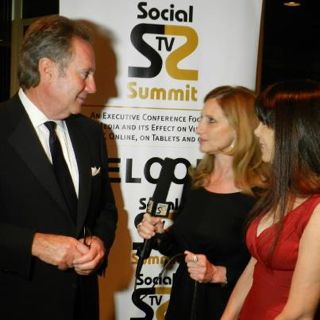
Top Photo – Andy Batkin, Marla Schulman, Julie Spira (L-R). Photo Credit: Social TV Daily
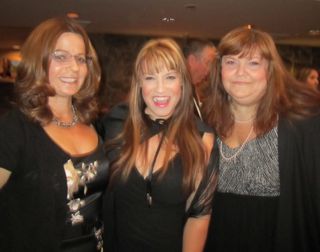
Lori Schwartz, Amber J. Lawson, Stephanie Piche (L-R)
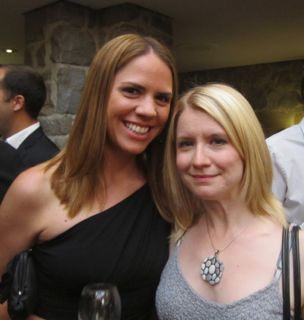
Amanda Coolong (R)
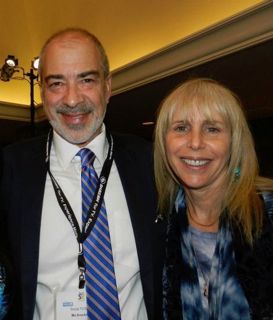
Mo Krochmal and Gayl Murphy: Photo Credit Social TV Daily
For more photos from the event, visit SocialTVDaily.com
Follow @JulieSpira on Twitter and like us at Facebook.com/socialmediaandmore
Experts Say Some Women Face Violence Through Social Media

 When I was asked as a cyber-relations expert to contribute to an article about cyberstalking and social media safety for Women’s E News, I was honored to provide my two cents worth.
The story appeared in the Ottowa Citizen, Cyberstalking turns web technologies into weapons. The article headline is pretty powerful and will raise several digital eyebrows.
Before you accuse me of being a “Debbie Downer,” you should know that I absolutely love social media. It’s changed all forms of communication, marketing, journalism, and helped develop strong bonds between people who have a voice that should be heard.
When it was pointed out to me that the U.S. National Violence Against Women Survey reported that 60% of cyberstalking victims were women, I realized that we all have a responsibility as friends on Facebook and followers on Twitter to take notice if any of our digital friends are in trouble.
In the U.K., a cyberstalking study conducted by the British Electronic Communication Harassment Organization at Bedford University found that harassment via social networking sites, mobile phone, and email was greater than stalking in-real-life.
As an estimated 4% of cyberstalkers appear on traditional online dating sites, my advice in the article was as follows:
“If a date goes bad or someone breaks up, the jilted person can use the very sites through which they met their victims to turn around and harass them,” says Julie Spira, creator of the site Cyberdatingexpert.com.”
It’s my mission to help people safely navigate the web, both in matters of the heart and in everyday life. Cyber-safety is at the top of my list and I hope you join me in making the the world-wide-web a safer place to reside.
Julie Spira is a cyber-relations and online dating expert and the author of the bestseller, The Perils of Cyber-Dating. She’s the CEO of Social Media and More and Editor-in-Chief at CyberDatingExpert.com.
Photo Credit: © MacX – Fotolia.com
7 Easy Steps to Customizing Your Facebook Timeline Page

 Today was the big day that many weren’t waiting for. Facebook officially migrated to the Timeline for pages. If you’re feeling a bit overwhelmed, you’re not alone. Many pages are still left blank without a cover photo. Even if you changed your cover photo, you might notice some unattractive pale blue application boxes on your page. This used to be the “Tabs” section and it’s now called “Apps.” We’ll provide a step-by-step list of how you can customize those thumbnails below.
With Facebook’s Timeline change comes a list of rules that you need to adhere to as part of Facebook’s Terms of Service and Guidelines.
Changing your Facebook thumbnail cover is no easy task, so we’ve listed detailed instructions on how to do this on your own.
First of all, review your page apps (formerly tabs) that might have been coded as FBML, Facebook’s version of html code. Your old applications may appear like these below:
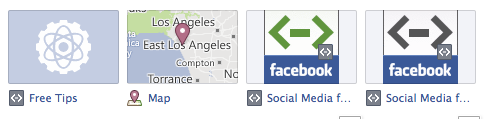
To customize them to one of the four allowed boxes, follow these instructions:
1. Click on the upper right side of the photo box. In the drop down, you can swap positions with the other four you’ve shown and delete apps you aren’t using. Decide whether you want a map to your location, photos, likes, email sign up, or videos.
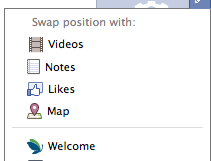
2. Go to your Admin Panel at the top of your page and click on “Manage.”
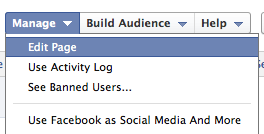
3. In the drop down, select edit page.
4. On the left side bar, click on “Apps”’

5. Click on “Go to App” and you can change the Title of the Box.
6. Click on Edit Settings and you’ll find “Custom Tab Image.” This is where you upload your thumbnail photo to replace to pale blue default image. You can also change the name here of the title of the app.

7. Click on OK and then you can move around the location of that particular app to appear on your page.
This is a perfect for you to build your mailing list or offer a free eBook on the front of your Facebook page.

Remember, while it might be easy to add a photo to your new cover, there are some things Facebook just doesn’t want you to include including your URL, requests to like your page or follow, or any direct sales action calls. Facebook wants your contact information with links to your business or offers to appear in your “About” section as shown above on our Rules of Netiquette page, where we also added a custom app with a cover providing a free chapter of an upcoming book.
To sum it up remember to optimize your new page by:
- Add a cover photo of 851 x 315 pixels that describes your business and is pleasant to look at.
- Add hyperlinks in the “About” section of your page to draw traffic to your website or specific offer.
- Customize your thumbnails and upload videos directly to your page so your customers can engage with you.
- Include your email subscriber embed code from your email provider and make sure to rename your offer.
- Remember to “Pin to the Top” your important posts, which will remain at the top of your page for seven days or up until you decide to pin something else.
Do you have any Facebook timeline tips that you’d like to share? Please add them in the comments.
Julie Spira is a social media strategist, bestselling author, and CEO of Social Media and More. Visit SocialMediaMore.com for more social media and facebook tips and like us at Facebook.com/socialmediaandmore
How to Get a Free Infographic for your Social Media Account

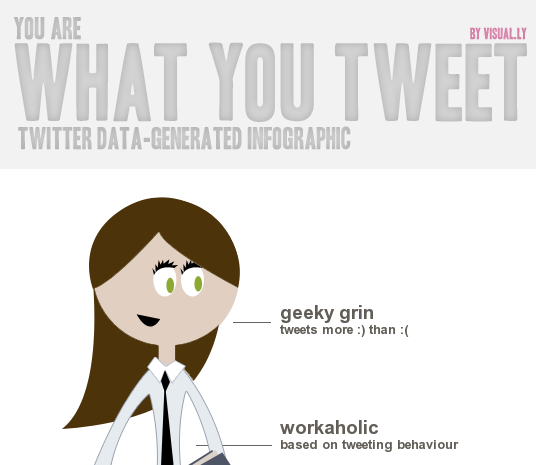 Who said creating an Infographic would break the bank?
Not a day goes by that I don’t see an interesting Infographic on a variety of subjects, which I happily add to my pinboards on Pinterest. Infographics are engaging, pleasant to look at, are filled with interesting statistics, and loved to be shared in the social media world.
The fine folks at visual.ly have a few free infographic tools based on your Facebook and Twitter profiles.
You can choose from the following topics:
- Life of a Hashtag
- Facebook Monster
- Twitterize Yourself
- Twitter Showdown, where you can go solo or compare yourself to one of your digital idols.
To do so, visit their site at create.visual.ly, like the on Facebook and follow them on Twitter.
Then select the template you’d like to use. You can share the link, or embed it in a blogpost as I’ve done below.
Enjoy!
For more information on social media strategy, like us at Facebook.com/SocialMediaandMore and follow @JulieSpira on Twitter.
Why You Need a Social Media Plan

Julie Spira – Social Media and More
With all of the changes on Facebook, live video on Instagram, and monitoring your SEO rank, it’s impossible to keep up with all of the trends.
Contact us to find out why you need a social media marketing plan.
Facebook Adds Page Translate Button to Compete With Google

 Parlez-vous français sur facebook?
Just announced today, Facebook has partnered with Bing to help you read posts from pages in different languages.
In the past, we’ve enjoyed Google Translate from web entries in a foreign language.
Here are some simple steps to activate this feature:
1. Click on account on the top right hand side of your page and change your settings to View as a Page.
2. Click on Edit Page on the top right hand side of your page.
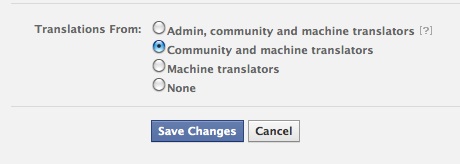
3. Click on Your Settings. You’ll have four choices to pick from:
- Admin, community, and machine translaters
- Community and machine translators (default)
- Machine translators
- None
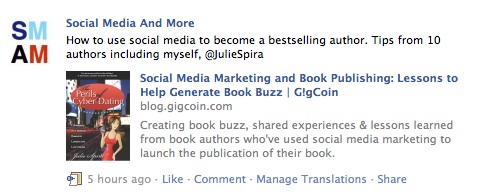
Under each post, you’ll now see the options to Like, Comment, Manage Translations, or Share each for each post.
Need more help? Straight from Facebook, here are the details on how you can enjoy this new feature. Not every language is presently available.
Today we launched a new translation tool that enables people to translate posts directly inline on Facebook Pages through Bing Translate. With this service, we are making it even easier for people to enjoy Page content on Facebook regardless of the languages that they know.
When someone clicks on the translate button on a public Page post, a Bing translation will appear in a popout window. People then have the opportunity to submit their own translation by opting-in to using inline translations. After their generated translation has received enough positive votes, it will replace the Bing translation and will appear each time someone clicks on the translate button associated with the post.
Page admins can always control how their content is translated within the “Your Settings” tab in the Edit Page view.
Also, effective October 31, 2011, Facebook will eliminate the discussions feature. Their reasoning? They’d rather have you interact on posts and comments.
What languages will you translate your facebook posts to?
Julie Spira is a bestselling author, social media strategist, and CEO of Social Media and More. Connect with Julie on Twitter @JulieSpira and at Facebook.com/SocialMediaandMore
Why You Should Go to BlogWorld Expo


I’ve attended numerous events including BlogHer, Social Media Week, SXSW, the 140 Conference, as well as shows with a social media element including NAB, CES, and AdTech. When I attended BlogWorld last fall for the first time in Las Vegas, I was welcomed into the community with open arms. The amount of shared knowledge that I experienced over the course of several days was enormously helpful. The building of personal relationships with those you have either communicated with on Twitter or Facebook, or admired from afar is something you will easily accomplish by attending the BlogWorld and New Media Expo. BlogWorld’s CEO Rick Calvert really makes you feel at home, even with the thousands of attendees and exhibitors on site.
This year, I will have the honor of speaking and presenting The Rules of Netiquette: How to Mind Your Virtual manners on Friday, November 4th at 1:45pm. I’ll be talking about Internet etiquette during BlogWorld’s largest expected audience yet. Even for those who have mastered social networking, we’re all guilty of breaking the ever-changing rules from time-to-time.
I had the opportunity to meet some of the already announced featured speakers in real life at the 140 Conference and other social media gatherings including Peter Shankman, Liz Straus, C.C. Chapman, and Jeffrey Hayzlett. Their voices and experiences will help transform your blog and brand. I look forward to meeting and mingling with the other speakers and attendees during the 3-day event on November 3-5, 2011 in Los Angeles.
The Social Media Business Summit is promising to be the world’s largest social media business conference. Monetization won’t be just a buzz word of something we hope to achieve at some point, but we will be educated on specific examples on how we can find an ROI on our tireless and passionate writing skills, master SEO, and engage through video and other social networking channels.
Whether you’re just using Twitter to chit-chat in real time with like-minded others, or are responsible for the brand identity of your business, information will be shared in November and I’m super-excited to be a part of it. From podcasting to sales letters, everything you need to know to be successful in Internet marketing will be covered at this event.
I invite you to join me at BlogWorld and New Media Expo – Nov 3-5 in Los Angeles!. And yes, I’m proud to be an affiliate of this wonderful conference. Prices go up on September 21st, so you still have time to get an early-bird ticket. I look forward to seeing you there.
~Julie Spira, CEO Social Media and More and author, The Rules of Netiquette
PICK MY BRAIN!
 Have a question about Social Media? I'll critique your site or blog, take a quick peek at your social media, and give you my expert opinion. Get 20 valuable minutes of my time to ask me anything.
CONNECT WITH US!


